

What is DNS?
DNS (Domain Name System) is a crucial component of the internet that maps a website's domain name to its IP address, enabling seamless delivery of web content to browsers. The DNS is a distributed system anchored by the root name servers. Below each root name server are DNS zones, which may consist of one or more domains (for example, google.com). Each DNS zone is assigned a set of “authoritative name servers". An authoritative name server can function as either a primary or a secondary server. The primary server stores the original version of a zone’s DNS records, while the secondary server maintains synchronized copies for redundancy and reliability.
What is DNS Traffic?
DNS traffic is the data exchanged between devices and DNS servers to translate human-readable domain names (like google.com) into numerical IP addresses that computers use. It’s the communication that allows your device to find and connect to the correct server when you visit a website, send an email, or use an online service.
DNS traffic is the behind-the-scenes communication that enables users to reach any website or online service. When someone types a domain name into their browser, their device sends a DNS query to a resolver, essentially asking, “What’s the IP address for this site?” The resolver might already have the answer stored in its cache. If not, it goes off to find it, checking the root servers, then the top-level domain (TLD) servers, and finally the authoritative DNS server that knows the correct address. Once it receives the correct IP address, the resolver sends it back to the user’s device, which can then connect to the site.
All of this happens before any real web traffic is exchanged. Because almost every online activity starts with a DNS request, DNS traffic becomes a convenient and practical place to apply filtering. By looking at DNS queries as they come in, security or content-filtering tools can allow, block, or redirect a request based solely on the domain. This approach is fast, lightweight, and practical, since it doesn’t require deep inspection of web traffic or disrupt the user experience.
Ultimately, understanding how DNS traffic flows through this process helps explain why DNS filtering is so powerful: it steps in at the very start, ensuring devices connect only to safe and approved destinations.
DNS for IPv4 & IPv6
For IPv4, DNS is most often tightly integrated with Dynamic Host Configuration Protocol (DHCP). DHCP provides IP addresses, DNS name servers, and other information to devices on a network, private or public. Therefore, the security of DNS also requires the protection of DHCP, which can be achieved through techniques such as DHCP snooping and limiting DHCP relay.
Depending on IPv6 network configuration, DHCP may or may not provide DNS information. For example, stateless address autoconfiguration (SLAAC) does not require a DHCPv6 server. The Router Advertisement (RA) message provides the name of the DNS server or servers.
Did You Know?
of businesses experience DNS attacks each year
estimated costs of a DNS attack
malicious websites are created every day
of websites tested by Google for malware were infected
What is DNS Filtering?
DNS filtering prevents access to malicious, illegal, or inappropriate online content. Some DNS filters also prevent malware infection by identifying and preventing access to malware-laden websites.
A DNS filter integrates with the Domain Name System (DNS) process to prevent access to websites based on a "blocklist" of domains. The filter sits between the user accessing web pages, social media accounts, or emails, and the DNS. When a request for an online resource is made, the DNS filter intercepts the request and checks for malicious activity. Some DNS filtering solutions work at the individual URL level, allowing broader web domain access while preventing specific URL addresses from being accessed.
However, static blocklists have struggled to address modern DDoS and web-based threats. AI now powers advanced DNS filtering solutions. These advanced DNS filters use machine learning, trained on a "threat corpora" to actively update lists of dangerous URLs, including emerging phishing URLs. AI-enabled DNS filters can quickly adapt to the evolving cybersecurity landscape, blocking malicious content in real-time.
How Does DNS Filtering Work?
Every website has an address based on its domain or, more accurately, an Internet Protocol (IP) address. In addition, all machines (e.g., websites, servers, and web services) have an assigned IP address, enabling user computers to locate and connect to other remote computers and the communication that supports our World Wide Web.
The Domain Name System (DNS) makes it easier for humans to use the internet and removes the requirement to remember all those number-only IP addresses. Instead, the DNS system translates readable alphanumeric names and words into a corresponding IPv4 or IPv6 address. DNS servers are located worldwide, mapping IP addresses to their corresponding domain names, much like a global telephone directory for websites.
DNS filters are designed to combat malware, ransomware, spam attacks, child pornography, phishing sites, and other malicious content on the web. Since DNS maps domain names to IP addresses, it acts as an interpreter and roadmap for the internet. Typically, when a browser queries a DNS server, an IP address is returned, enabling the browser to connect to a web server and make a request to open a website at the specified IP address.
DNS filtering services use the Domain Name System to block malicious website threats and filter out harmful web content. They ensure that network data remains secure and allow organizations to control what their staff can access on company-managed networks.
A DNS server using content filters blocks web requests rather than returning an IP address. It is also helpful for organizations that want to protect internal assets by blocking known malicious sites. This function is usually conducted at the router level by blocking IP addresses or filtering ports. AI-powered DNS filtering and DNS filters are powerful and efficient security solutions for those without access to high-end routers. Cloud-based, AI-powered DNS filters utilize machine learning to capture web requests from both local and remote employees, blocking inappropriate or malicious domains. Using machine learning allows the DNS filter to identify emerging threats that would otherwise go unchallenged.
How Does DNS Filtering Know What to Block?
DNS filters must be constantly updated as new malicious websites emerge. The DNS filters utilize the latest threat intelligence information to more accurately block malicious domains from loading in a browser. Many different threat intelligence services maintain databases of compromised IP addresses. Whenever a partnered cybersecurity service identifies malicious activity on a new website, it contributes that information to one of these threat intelligence providers.
However, if a compromised website isn't listed in a DNS filtering database, conventional filters would not prevent users from accessing it. This has led to the development of advanced DNS filters that utilize machine learning to augment the static list, ensuring that emerging threats are recognized as malicious.
DNS filtering solutions are only as reliable as the data they access. High-quality filters with comprehensive databases can detect and block malicious websites more effectively than others. A continuously updated filter will update its database with the latest threats to keep your organization safe and secure. AI-powered DNS filters augment the data by training the machine learning algorithm on threat data from millions of endpoints and users. AI ensures that the list more closely reflects the threat landscape.
What is a DDoS attack?
A DDoS attack is a cyberattack in which an attacker overwhelms a server, website, or online service with massive amounts of traffic from many compromised devices, causing it to slow down or become entirely unavailable for legitimate users. These attacks are typically carried out using a network of infected machines, a botnet, that the attacker controls to flood the target with requests. Cybercriminals commonly use DDoS attacks and have disrupted businesses, governments, financial institutions, and individual users.
How Vital is DNS Filtering in 2025 and the Future?
The DNS remains a vulnerable, highly targeted component for exploits and cyberattacks. For example, in “Sitting Duck” attacks, cybercriminals exploit a misconfiguration of a DNS to take control of a website. In other attacks, spoof DNS replies feed false information that redirects users from legitimate websites to malicious ones. New techniques and exploits are continually evolving. DNS attackers are now leveraging AI to automate their attacks.
Domain generation algorithms (DGAs) that use AI to automate the rapid creation of malicious websites pose a serious threat. Thousands of new websites are rapidly registered by cybercriminals using DGAs, putting pressure on threat intelligence providers to keep up. As soon as any security provider detects malicious activity on a newly registered website, cybercriminals can create a new website and continue their attacks.
The critical function of DNS makes the system a primary target for hackers; securing DNS is imperative. An effective DNS security strategy involves blocking malicious queries and responding to legitimate ones. Performance should be preserved, and legitimate queries must pass filters and return results.
DNS plays a vital role in a layered network security strategy, where multiple approaches to cyber defense are required. This multi-tiered approach reduces the possibility of a successful hacking attack.
Fighting the AI-enabled proliferation of malicious sites requires an advanced approach that utilizes machine learning. DNS filters for 2025 and the future must be AI-powered. The AI (machine learning) behind these DNS filters augments the conventional static lists of known malicious domains. Machine learning is trained using a vast corpus of threat data, which is then utilized by the AI to identify emerging threat patterns and signals. AI-powered DNS filters are essential in preventing users from accessing malicious websites.
How DNS Filtering Strengthens Security?
DNS filtering cannot stop every threat. All organizations should build multiple layers of security, and an attacker must bypass several of them before gaining access to data. A DNS filtering solution is one layer of a comprehensive security strategy.
Along with DNS filtering, organizations should have a network security strategy that incorporates port monitoring, intrusion detection systems, intrusion prevention systems, next-generation antivirus and antimalware applications (NGAV), and firewalls. These necessary security layers work cohesively to create a functional and highly effective security protection system.
Compared to sophisticated detection-based systems, DNS filtering offers some clear advantages for security-conscious organizations:
- Maintaining a successful DNS filtering policy requires fewer resources than many sophisticated detection-based technologies.
- DNS filtering informed by high-quality threat intelligence providers and machine learning can protect users from zero-day and emerging threats before all the details of the threat are known.
- Modern DNS filtering technologies are robust and minimize false positives.
Even with its advantages, DNS filtering has some risks:
- DNS filters are not bulletproof. Some malicious attackers are clever enough to bypass it, and new tactics and techniques are evolving that utilize AI.
- Users can use proxies to hide their original IP and gain access to the DNS-queried IP address.
- Modification of the DNS protocol could lead to unforeseen security issues and technical bugs.
No system is bulletproof, and while cybercriminals constantly change domain names, AI-powered DNS filtering is highly effective in countering their cloaking efforts. WebTitan DNS Filtering accomplishes this by categorizing approximately 60,000 malware and spyware domains daily based on threat intelligence and augmenting this static list with machine learning trained on a threat corpus of over 500 million visited URLs to identify emerging threats.
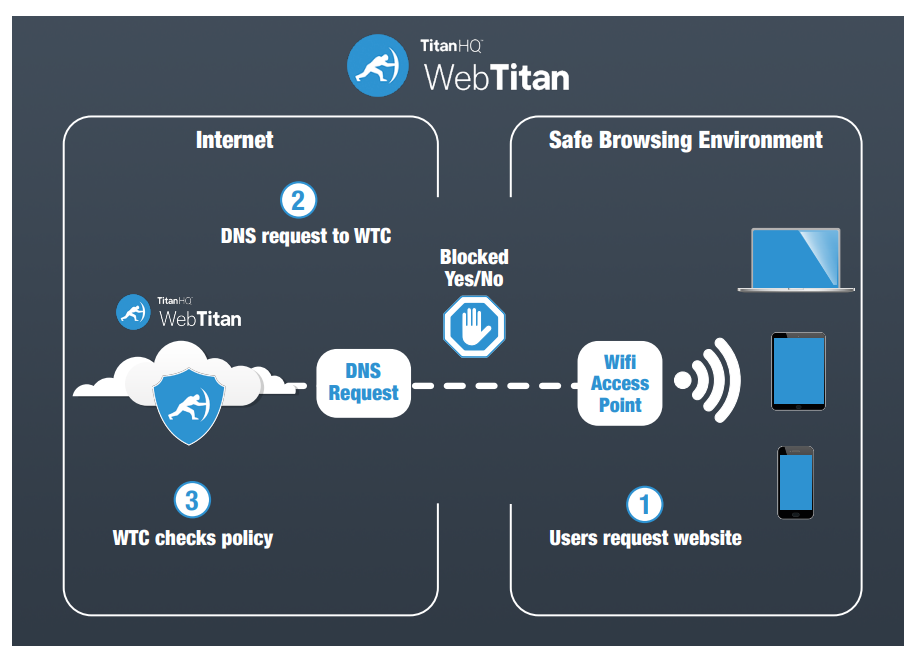
Examining DNS Structure
The Domain Name System (DNS) was designed to make it convenient for the public to use the Internet. As mentioned earlier, it translates domain names to the matching IP addresses of the hosted devices. DNS allows us to use https://www.google.com instead of http://74.125.224.72/ to initiate a search. In short, it is the internet's primary directory service.
The DNS system that services the internet is a distributed system anchored by a collection of root name servers dispersed worldwide. Under the root servers are top-level domains (.com, .org, .net) followed by second-level domains (Google, TitanHQ, Microsoft).
These domains form DNS zones, which may consist of one or more domains (for example, google.com is a domain). A set of authoritative name servers is assigned to each DNS zone.
An authoritative name server can be either a primary or a secondary server. A primary server contains the original read/write copies of zone records, while a secondary maintains only readable copies of the master records that are updated through replication.
DNS servers use TCP port 53 for zone transfers to keep the secondary synced with the primary zone file. Intruders can use this mechanism to download the contents of a name server's zone file. To prevent this, administrators should block zone transfer requests from any device that is not an authorized secondary name server. Port 53 is often used to tunnel unauthorized traffic, and an organization’s IT team should monitor suspicious traffic.
What is Reverse DNS?
A reverse DNS lookup or reverse DNS resolution (rDNS) is querying the Domain Name System (DNS) to determine the domain name associated with an IP address, the reverse of the standard "forward" DNS lookup of an IP address from a domain name.
Reverse lookup is often valuable for determining the legitimacy of an IP address. For example, your DNS filter may look up forward and reverse DNS entries to discover whether they consistently match one another.
If the reverse lookup generates records that show discrepancies between entries, it may indicate a compromised website. This is one of the valuable investigative capabilities that high-quality DNS filtering solutions provide to organizations.
How are DHCP and DNS Related?
Under the standard IPv4 Internet protocol, DNS is often tightly integrated with the Dynamic Host Configuration Protocol (DHCP). A DHCP server automatically provides IP addresses and other information to DHCP-enabled clients, such as the identity of DNS name servers. A DHCP server can assign both static and dynamic IP addresses, but public web servers typically require a static IP address to remain available.
In more advanced IPv6 network configurations, DHCP may or may not provide DNS information, as the Router Advertisement (RA) message typically provides this information instead. Whether you use IPv6 or IPv4, you must also protect DHCP to effectively protect DNS and web content.
DNS Attacks
As the directory for the Internet, DNS servers must be available to all, whether black hat or white hat. DNS attacks exploit this availability. For example, a black hat will identify an open DNS resolver to launch a distributed denial-of-service (DDoS) attack, either against the resolver itself or against other systems. The target will then receive a deluge of DNS replies from all over the Internet. DNS replies can be spoofed or created with false information to redirect users from legitimate sites to malicious websites.
New attack techniques, such as DGAs, are making rogue domain identification harder to detect. MITRE ATT&CK, who track and catalogues cyberattack techniques, notes this about DGAs:
“Adversaries may make use of Domain Generation Algorithms (DGAs) to dynamically identify a destination domain for command and control traffic rather than relying on a list of static IP addresses or domains. This has the advantage of making it much harder for defenders to block, track, or take over the command and control channel, as there potentially could be thousands of domains that malware can check for instructions.”
Types of DNS Attacks
DNS is a double-edged sword primarily because of the numerous bypasses and exploits available, making it vulnerable to these types of attacks:
Dynamic DNS (DDNS)
DDNS is used legitimately to allow a domain name address to change quickly and to host servers on temporary addresses. However, a DDNS can be abused by botnet operators and phishers who change addresses rapidly to avoid detection. Filters often block dynamic DNS hosts. AI-enabled domain generation creates an increasingly sophisticated playground for carrying out these attacks.
DDNS makes it difficult for DNS filters to keep up with malicious activity. Even if the filter blocks some of the addresses, it may be unable to stop them all without sophisticated DNS-layer protection that is AI-enabled.
Fast Flux DNS
Fast Flux DNS allows cybercriminals to rapidly alter DNS addresses to hide malware and phishing delivery sites behind an ever-changing network of compromised hosts acting as proxies.
Attackers achieve this by exploiting a load-balancing technique called round-robin DNS. Typically, this type of service is designed for websites with content on several redundant servers in different countries worldwide.
Packet Amplification
This technique is called a Smurf attack (named after the DDoS Smurf malware). It’s a distributed denial-of-service attack involving many ICMP packets with the intended victim's spoofed source IP broadcast to a computer network using an IP broadcast address.
This attack leverages the disparity in bandwidth consumption between attackers and the targeted web resource. Attackers send small queries that result in significant, resource-intensive responses and tell the server to direct the response toward their target.
DNS Amplification
This popular form of DDoS relies on publicly accessible open DNS servers to overwhelm a victim system with DNS response traffic. It is called a "DRDoS Attack" (Distributed Reflection and Amplification Denial-of-Service).
This attack often starts with a DNS lookup request to an open DNS server. Then, it spoofs the source address, tricking the server into believing it is the target address. Once the DNS server returns the record response, it is passed to a target the attacker controls.
DNS Tunnelling
DNS tunnelling involves the encoding of data into DNS queries and responses. These data payloads typically allow hackers to take over and manage the DNS server with remote server applications.
This attack often relies on DNS infrastructure connected to a compromised system, which provides cybercriminals with potential access to the internal DNS server. Additionally, the attack relies on the fact that DNS traffic can sometimes bypass firewalls and other systems without scrutiny.
How to Prevent DNS Attacks
Security administrators can configure the DNS to mitigate common security issues. One such configuration allows the system to accept and respond to DNS requests from any source on the Internet. DNS servers that automatically accept incoming requests are referred to as open resolvers. Cybercriminals exploit open resolvers to launch cyberattacks against their targets, including your DNS.
To avoid an open resolver exploit, configure your DNS server to restrict its ability to respond to DNS requests from any address on the Internet. Only allow in-house recursive servers for your company's IP subnets. If you are operating an extranet, this should also include customer ranges.
Remember, many, if not most, DNS resolvers across the internet are open resolvers. They have yet to be secured or are meant to be publicly available. Test your IP address for open resolvers here.
Although there is no guaranteed way to stop a DNS attack, the following measures can mitigate damage:
- DNS blocking for security against phishing and spam can help stop DNS attacks. This mechanism makes it difficult for entities to locate specific malicious domains or websites used in attacks from a compromised device.
- Configure your authoritative DNS servers to use DNS response rate limiting.
- DNS traffic should be throttled depending on the type of DNS packet. For example, a zone transfer reply would have a higher threshold than a reply for the name of the DNS server.
- Work with your Internet provider to block or throttle traffic you do not want on your network.
- Monitor your network and make a note of client IPs using unusual amounts of bandwidth.
- Publicly exposed sites should be load-balanced and include resource reserves for additional bandwidth and CPU cycles to handle increased loads caused by an attack. Google endorses this practice.
For any organization that takes network security seriously, protecting DNS infrastructure is an essential part of an enterprise security plan. With a little time and effort, DNS security will provide immediate and significant security benefits.
Preventing a DNS attack
Your DNS can be configured to mitigate common DNS security issues. According to the Open Resolver Project, “Open resolvers pose a significant threat to the global network infrastructure”. It is important to prevent your DNS server from acting as an open resolver and responding to DNS requests from any address on the Internet. Restrict in-house recursive servers to the IP subnets used by your company. This includes customer ranges as well if you are operating an extranet. Keep in mind, however, that many (if not most) DNS resolvers across the Internet are open resolvers, either because they have not been secured or are intended to be publicly accessible, such as Comodo’s service.
To test your IP address for open resolvers, see http://www.thinkbroadband.com/tools/dnscheck.html
How to identify malicious traffic
Although there is no guaranteed way to stop a DNS attack, the following layers of security measures can mitigate damage:
Basic protection: anomaly detection, heuristic analysis, signature-based detection.
AI-powered protection: Machine learning algorithms, behavioral analysis, deep packet inspection.
How Does DNS Filtering Work in Shared Offices?
Many organizations have employees logging in from co-working spaces worldwide. Some enterprises may keep a significant portion of their workforce in distributed environments like these; managing an effective DNS filtering policy under these conditions can be particularly challenging.
A shared coworking space may share network infrastructure with hundreds of different organizations. This high degree of connectivity may sometimes be protected by a free wireless internet connection with a single password shared among all customers.
Virtual Private Networks (VPNs) represent one of the most straightforward solutions for addressing DNS risks associated with remote workers in shared infrastructure environments. However, maintaining an organization-wide VPN policy is an expensive and complex undertaking.
As a result, organizations are increasingly moving towards managed DNS service providers. By entrusting their DNS-level security to a managed service provider, they can effectively leverage a scalable solution for managing DNS security.
MSP DNS filtering allows organizations to implement strict filtering policies for employees who log in from shared coworking spaces.
MSPs Can Use DNS Protection to Keep Their Customers Safe
Managed service providers (MSPs) are under pressure to manage complex security environments in a scalable and cost-effective way. MSPs must deploy and secure various security technologies to fit their customers' unique security risk profiles. This can present problems for DNS-level security workflows that rely on in-house resources and manual processing.
MSPs who package robust, scalable DNS filtering solutions into their services can offer their customers better security performance. Advanced solutions, such as WebTitan DNS filtering, open the customer landscape to include highly distributed remote teams that are difficult to secure using traditional DNS solutions.
Introducing WebTitan DNS Filtering
WebTitan DNS Filtering is a solution that restricts or blocks access to certain websites or domains. WebTitan provides protection to create a safer, more productive online working environment.
WebTitan DNS Filtering also works with protocols such as FTP and SMTP. However, this article focuses on its specific application for web filtering.
WebTitan DNS Filtering enables advanced network security configurations at the domain level. For example, if you attempt to visit a website and the domain is identified as malicious, WebTitan DNS Filtering will block or redirect the request to a secure page, depending on its configuration.
Initially, WebTitan DNS Filtering was implemented to configure the DNS settings at the router/gateway level on physical machines residing on-premises. In recent years, businesses have increasingly outsourced these administrative efforts, relying on external support from Internet Service Providers (ISPs) and Managed Security Service Providers (MSSPs).
Today, the process is streamlined: companies purchase a premium or enterprise DNS solution, then configure the network to process DNS requests through that service. The company will then have a functional WebTitan DNS Filtering solution, which will quickly secure their implementation.
Before making a significant decision that could impact your network security and future cyber protection plans, it is essential to understand the advantages, limitations, and details of scaling a standard WebTitan DNS Filtering solution for web filtering.
Advantages of WebTitan DNS Filtering
WebTitan DNS filtering provides several critical protective measures. One of the most important is the ability to block access to malicious and compromised websites that are considered "objectionable" sites, such as those hosting content related to pornography, violence, terrorism, and other inappropriate content. As an AI-enabled web filter, WebTitan augments conventional DNS filtering techniques to detect emerging threats.
WebTitan DNS Filtering is an ideal solution for many businesses and organizations, with essential advantages including the following:
- Lightweight
- Fast
- Scalable
- Premium and enterprise-level offering
- Offers advanced flexibility for policy management and customization.
Because every organization operates differently, with its own unique requirements, cultural norms, and web browsing habits, WebTitan DNS Filtering allows IT teams to support custom-tailored configurations.
One of the most significant advantages of WebTitan DNS Filtering is its use of multiple layers of protection, including machine learning, to proactively block access to potentially harmful websites.
However, when we examine standard payload delivery methods and points of compromise from various online threats (e.g., malware, ransomware, phishing attacks), we find a glaring common denominator: good old-fashioned user errors. People click on links and navigate to harmful web content. WebTitan DNS Filtering eliminates human error by combining machine learning with feeds from trusted cybersecurity companies. Together, this armory provides a reliable wall of defense. When network traffic and users have restricted access to undesirable websites (particularly malicious and objectionable sites), several low-hanging security risks are immediately removed.
In addition, if you're a business owner, you get the added benefit of preventing users from accessing materials that could hinder their productivity or cause offense to others throughout the day (e.g., social media, questionable blogging sites, etc.).
Security and filtering providers like TitanHQ offer hybrid deployment options that support standard WebTitan DNS Filtering and full-path URL filtering and analysis. This combo enables an organization to develop and implement advanced solutions that help block redirection and listing domains. WebTitan also supports full-path content categorization, analysis, malicious detection, traffic analysis, and more. For communications companies, security vendors, and other organizations where security is a primary concern, a scalable and secure infrastructure is crucial for achieving scalability, agility, and long-term growth.
WebTitan DNS Filtering Solutions
No single cybersecurity solution is 100% effective against an evolving threat landscape. However, WebTitan DNS Filtering offers an essential critical network infrastructure to protect your internet traffic and users. DNS filters are part of a robust strategy that involves trusted security partners, feeds, and other technologies to deliver maximum protection.
Next-generation antivirus, spam filters, two-factor authentication, and thorough remediation policies are all critical aspects of network defence.
WebTitan DNS Filtering enables organizations to implement comprehensive, forward-thinking, and robust Internet usage policies, blocking access to malicious website content and other threats that can harm their business. You may not be able to prevent hackers from targeting your company, but by deploying a robust infrastructure using technologies such as WebTitan DNS Filtering, you can significantly enhance your defense against known threats and reduce the likelihood of accidental user error leading to a cyberattack.
Get Started with WebTitan DNS Filtering
Learn more about how WebTitan works and how it can protect your business against malware, phishing, viruses, ransomware, and links to malicious websites.
- DNS Filtering
Talk to our Team today

DNS Filtering FAQs (FAQs)
When users request a website domain from a browser, DNS filtering examines the request and determines if it should be completed. Because DNS filtering runs on the DNS protocol during a name lookup, organizations can block all requests before any malicious content is downloaded to the user’s local device.
Users don’t need extra steps to benefit from DNS filter protection. Organizations typically incorporate a DNS filter into their DNS system, either in the cloud or on-premises. WebTitan DNS filtering enables customizations and preferences to configure user groups and their settings, providing granular control over web filters.
Instead of using proxies, a DNS filtering system hosted on a domain name system performs a lookup against a threat database to determine if a website is malicious. Because all browsers use DNS to perform a name lookup, malicious domains can be blocked more effectively by validating domain legitimacy during every DNS query. AI-powered DNS filters, such as WebTitan, augment static malicious domain lists by using machine learning algorithms to detect emerging patterns.
DNS filters integrated into a network work to warn users via a browser via a warning message whenever a malicious site is requested. A DNS filter can block malware, ransomware, phishing, drive-by downloads, trojans, and other web-based attacks.
Organizations are continually targeted by web-based threats. However, DNS filters block threats, such as malware, and prevent users from navigating to malicious and phishing websites. A web filter is an organization's first line of defense to protect data from web-based attacks.
DNS filtering is the process of using the Domain Name System to block malicious online threats such as viruses, malware, ransomware, phishing attacks and botnets and filter out harmful or inappropriate content. This ensures that company data remains secure and allows companies to control which web content employees can access. WebTitans DNS filtering offers you cloud-based DNS Filtering to bring powerful enterprise filtering to all your users, regardless of their location.
DNS filtering doesn't just block sites but can also prevent malware, malicious software and phishing attacks on the employees devices.
MSPs can benefit from DNS filtering by saving time and money on customer call outs for cyber-attacks, providing enhanced protection against emerging threats, generating recurring revenue, differentiating their security offerings, and reinforcing their trusted IT advisor status.
WebTitan DNS provides real time AI driven DNS protection from malicious online threats such as viruses, malware, ransomware, phishing attacks and botnets. WebTitan DNS filter exists to make the internet a safer and more secure place and block malicious cyber attacks at the DNS layer.
Yes, you can initiate your free trial of WebTitan DNS Filter by clicking on the "Book Free Trial" button on the website.
WebTitan DNS Filter serves two main purposes: Providing a security layer against malware, phishing, viruses, ransomware, and malicious sites and offering advanced content control for brand protection within your network.
WebTitan DNS Filter offers the following benefits: Malware, ransomware, and online threat protection for end users; Utilizes a URL Classification database and AI-driven threat database used by over 650 million end users; 24/7 remote user protection and work-from-home security; Comprehensive reporting capabilities; Exceptional customer support and much more.
WebTitan DNS Filter can be deployed in three ways: 1) Gateway/shared cloud deployment; 2) Private cloud deployment (hosted on AWS with failover); 3) Hosted by you in your data center.
Some unique features include Safe Search enforcement, block and allow lists, AD integration, roaming agent for BYOD environments, full IPv6 support, and customizable block pages.
WebTitan DNS Filter boasts market-leading accuracy, coverage, and malicious website detection gathered through real-time analytics from millions of end users. It provides real-time auto threat and category updates.
DNS filtering is a crucial part of network security, as it stops threats at the source before they can access your network. It's a malware killer, prevents C2 callbacks, requires no hardware or software installation, scales in real time, and doesn't require HTTPS decryption.