DNS is an integral part of the internet. Without it we would all have to be very good at memorising numbers, can you imagine connecting to 216.58.208.36 rather than www.google.com to do a Google search? DNS is also used to provide access to certain spam tests. The following spam tests all require DNS to function:
DNS Block Lists (RBL) - These services list the IP addresses of known spammers
URI Block Lists - These services list domains that have been compromised/abused
SPF - The SPF record for a domain is accessed via DNS
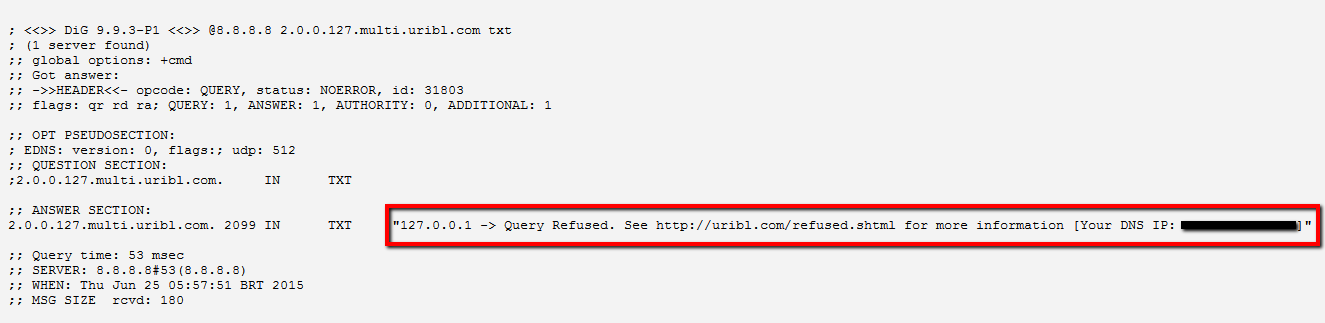
However, the spam test providers do not reply to DNS queries from all servers. In particular they will not reply to queries that originate from high volume DNS servers such as 8.8.8.8, 4.2.2.1, etc. If you use a high volume DNS server, or your DNS server forwards via high volume DNS servers, then it is likely that your SpamTitan server is not blocking as much spam mail as it could be.
Identifying the problem
How can you tell if your DNS server is getting accurate replies?
One of the spam test providers (uribl.com) has a test you can use to see if your DNS server is being blocked. It is a simple DNS query you can run from your SpamTitan server or PC.
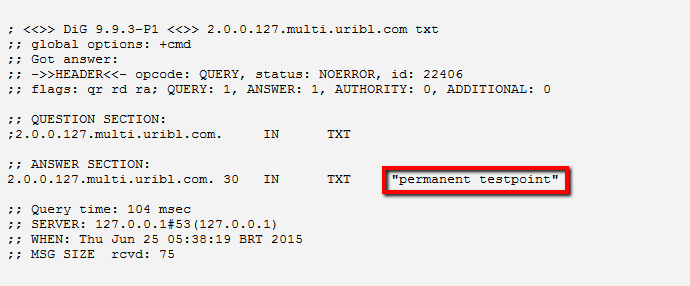
To carry out the test on your SpamTitan server do the following:
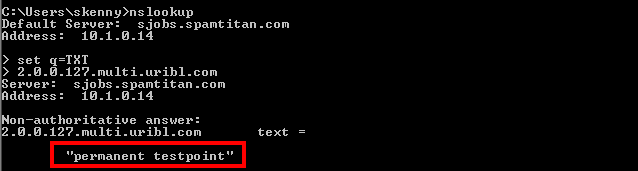
To carry out the test on a PC do the following:
You will get one of two responses:
This response indicates that your DNS server is blocked (X.X.X.X will be replaced with your IP address or the IP of the DNS server you are forwarding through):

This response indicates that your DNS server is not blocked:
If you are being blocked this indicates that you are using a high-volume DNS server, or forwarding through a high-volume DNS server. To resolve this issue you will need to use a different DNS server, or stop your DNS server from forwarding via a high-volume DNS server.
SpamTitan do not provide DNS servers

Call us on USA +1 813 304 2544 or IRL +353 91 545555
Contact Us